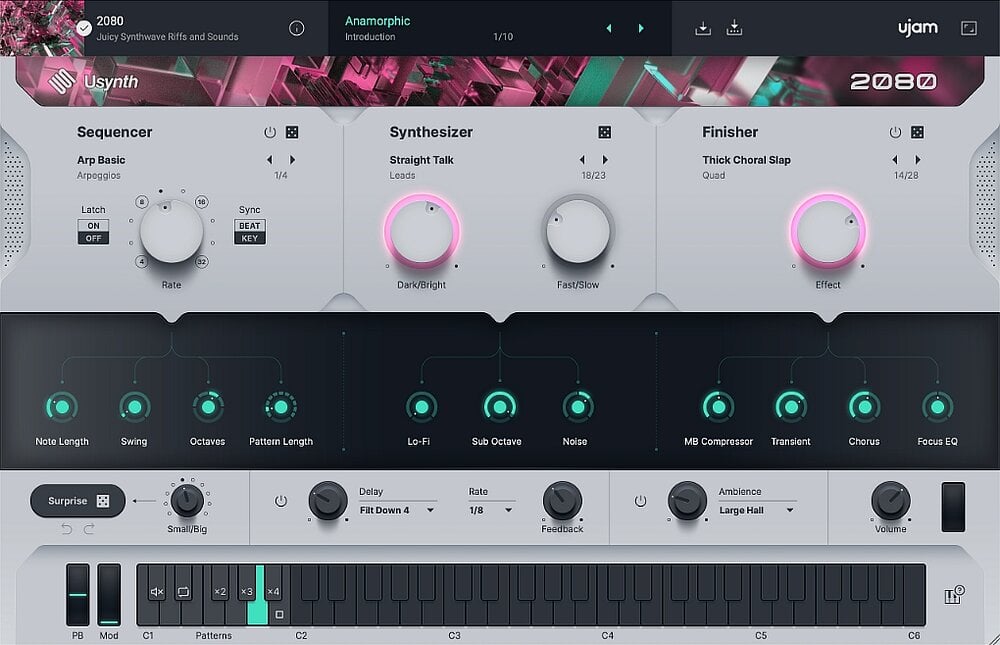
Synthesizers made in the style of UJAM – sound design and performance with ease. Say hello to a new universe of creative expression! No more scrolling through hundreds of presets in a regular synthesizer looking for the perfect starting point for a lead, or spending hours working on a single patch that you will only use for 4 bars of the entire song. The faster you create, the faster you will improve as a producer.
Quality
Under the hood, Usynth is a very complex synth. Each instance consists of 2 separate layers for each voice, including virtual analog, wavetable, FM and multi-sample synthesis, a multi-mode filter, 5-stage envelopes, LFOs, a 12-band modulation matrix and much, much more. But why should you care?
Simplicity:
Usynth does not require you to know how a synth works to find and create new inspiring sounds. Intuitively customize as you like. Think of Instagram filters or a steering wheel and two pedals – that’s how you control Usynth.
This release is a full version of the Usynt synthesizer, consisting of 3 “parts”.
In fact, I combined three distributions into one for your convenience.
With small comments, I will describe the entire installation process. Since even R2R noted more than once the crookedness in the UJAM developments themselves, there were periodic problems with hacking and operability.
If you do exactly as R2R recommends, everything works fine.
I personally checked it in Cubase 14.0.32 and Reaper 7.45. Windows 10 22H2. My screenshots.
I will separately post the original texts from R2R.
And here is the installation order with comments on how everything really worked.
- Install UJAM.App.v1.2.0-R2R following the Instructions Strictly.
R2R:
“Uninstall and install
- Uninstall previous versions.
Remove:
%PROGRAMFILES%\UJAM\UJAM\
%APPDATA%\ujamapp\ - Block access to the following hosts.
0.0.0.products.ujam.com
0.0.0.0.software.ujam.com
0.0.0.0.ujam.com
0.0.0.0.www.ujam.com
Blocking UjamApp with a firewall is a good way,
but UjamApp needs to connect to your plugin.
If you completely disable the connection, including 127.0.0.1,
it can lead to another problem. (In short, I entered four addresses with 0.0.0.0 in the host.)
- Install the UJAM application.
- If the UJAM application (UJAM.exe) is running,
close it from the notification area or task manager. - Replace “app.asar” with “%PROGRAMFILES%\UJAM\UJAM\resources\”.”
Comment: a green UJAM icon will appear, this is necessary for the plugin to work, in the Task Manager when the computer boots, we will find Ujam files, similar to how they go to startup with Waves. There in the Manager, if the UJAM icons are lit, stop them before replacing the file, after rebooting they will appear themselves.
- Open the UJAM.Usynth.Library.v1.4.0-R2R folder.
Mount the ISO and copy the contents, i.e. “Usynth Library” to the place where the library will be stored. It is better not to press the “Usynth_LibraryPlacer.exe” button until you decide for sure that the library will be stored here. There are 9.7 GB on any of the disks. Synth will find it itself later. - And finally, installing the plugin, here is a comprehensive description, considering that we have completed the previous points.
R2R:
“Release UJAM Usynth version 1.4
Understand How It Works
To create sound, you need at least 3 things.
UJAM application: it manages libraries and activations.
UJAM library: The sound library that will be used in this release.
UJAM plugin: This release. It does not contain sound.
UJAM.App.v1.2.0-R2R
UJAM.Usynth.Library.v1.4.0-R2R
UJAM.Usynth.version 1.4.0-R2R
Install
0.Uninstall previous versions.
1.Install the UJAM app from R2R.
2.Install the library. Our release includes the Placer library.
3.Install the plugin.
4.Restart your computer. REQUIRED!
5.Enjoy!
Please note that Usynth/Virtual Pianist can easily freeze on startup if it cannot communicate with the UJAM app.
We recommend you test it with a simple host like VSTHost before scanning for plugins in your main DAW.
We tested the UJAM versions on several clean, standalone computers.
Good luck!
R2R TEAM 2025″
Comment: EVERYTHING! If you do it right, then play and enjoy! Before the first launch, on the recommendation of R2R, I first opened it through VSTHost, to make sure that everything is ok. I can’t help you any more if you suddenly have an error, etc. There is comprehensive information here, there are no other options. There were posts on the forums “it doesn’t work” everyone unanimously answers – Everything works, install carefully according to the Instructions, no one will sort out the jambs in individual hardware. Good luck.
UJAM App Release
Uninstall & Install
0.Uninstall previous versions.
Clean up :
%PROGRAMFILES%\UJAM\UJAM\
%APPDATA%\ujamapp\
1.Block the access to following hosts.
products.ujam.com
software.ujam.com
ujam.com
www.ujam.com
Blocking the UjamApp by firewall is a goodway,
however, UjamApp needs to communicate with your plugin.
If you completely shut the connection incl. 127.0.0.1,
that may lead to another problem.
2.Install UJAM App.
3.If UJAM App (UJAM.exe) is running,
close it from notification area or task manager.
4.Replace “app.asar” in “%PROGRAMFILES%\UJAM\UJAM\resources\”.
5.Enjoy!
Usage
After you installed new UJAM products, you need to restart UJAM App manually.
This will renew the internal product list.
Other than that, you don’t need to do anything.
Plugin launches UJAM App and communicates with it.
UJAM App GUI shows “No Internet Connection” but that is expected.
We prefer eternity to online dependency, don’t we?
Troubleshoot
If plugin failed communicating with UJAM App, it shows blurry window on the plugin.
Sometime plugin cannot even be loaded.
If you think you installed the UJAM App correctly,
you need to doubt your OS setting and firewall things.
UJAM App has its own protocol.
If you cannot start UJAM App by “ujam://silent-start” from Run command,
UJAM App is not installed properly.
Good luck,
TEAM R2R 2023
UJAM Usynth v1.4 Release
Understand How It Works
You need at least 3 things to make sound.
UJAM App: It manages libraries and activations.
UJAM Library : The sound library to use with this release.
UJAM Plugin: This release. It doesn’t contain any sound.
UJAM.App.v1.2.0-R2R
UJAM.Usynth.Library.v1.4.0-R2R
UJAM.Usynth.v1.4.0-R2R
Install
0.Uninstall previous releases.
1.Install UJAM App by R2R.
2.Install Library. Our release has Library Placer.
3.Install Plugin.
4.Restart computer.
5.Enjoy!
Keep in mind that Usynth / Virtual Pianist easily hangs up at startup if it fails communicating with UJAM App.
We recommend you to test with simple host like VSTHost before scanning plugins in your main DAW.
We tested UJAM releases on some clean offline computers.
Good luck!
TEAM R2R 2025